Financial Planning for Adults Age Group Between 20-30 Years
- June 11, 2026

February 28, 2026
The Provident Fund (PF) is an investment plan that aims to offer long-term savings for people employed on salary basis. Under the EPF scheme, an employee’s contribution, along with his or her employer’s contribution, of a certain percentage of the salary, is deposited each month, with interest added up.
The account holder may withdraw the money in certain circumstances, such as retirement, changing jobs, or when faced with urgent financial needs. With the evolution of technology, it has now become easier to withdraw pf online.
As per the official website of EPFO, some of the key services offered by EPF include online claim filing, UAN management, and access to passbook.
Digitisation in the field of finance in India has made the process of withdrawing pf online much easier than before for employees. It used to take several forms, approval from the employer, and even physical trips to the office of the EPFO in earlier times. However, most of these procedures can now be performed either on the official EPFO website or the application.
To withdraw pf online, a person needs to have their Universal Account Number (UAN), linked Aadhaar, PAN, and bank account information. These are used for quick verification purposes. After completing the KYC process, users can make a claim to the provident fund online using the EPFO member login itself.
Before applying for the claim, one must check that:
This portal supports both complete as well as partial claims based on certain criteria such as unemployment, retirement, etc., in case of any emergency. Forms such as Form 19, which is for pension withdrawal, Form 31, which is advance form, and other such forms may be submitted.
As per EPFO, the majority of the claims filed will be completed within 7-20 days using online services.
The EPF is a retirement saving fund that is regulated by the Employees’ Provident Fund Organisation under the Government of India. The objective of the fund is to facilitate the accumulation of money for the benefit of employees earning a salary, through consistent contributions made both by the employee and employer on a monthly basis.
In line with the provisions stipulated by the Employees’ Provident Funds Scheme, the contribution made by the employer and employee amounts to 12 percent of the salary and dearness allowance received by the employee. While some of the contributions made by the employer go into the EPS, the rest is credited to the EPF account.
A major advantage of the EPF is that it helps people get financial assistance during their retirement or while changing their jobs, as well as in case of any emergency situation. Employees may also apply for an online EPF claim if they satisfy all the requirements set for eligibility. The use of online services has made the online EPF withdrawal process much easier and faster, without the need for any manual procedures.
Another important thing is that the EPF account is integrated with the Universal Account Number (UAN). This makes it easy for employees to monitor their balance and move money from one employer to another.
Universal Account Number (UAN) is a 12-digit unique number that every employee who has been paying for the Employee Provident Fund Scheme gets. The Employees’ Provident Fund Organisation is responsible for assigning this number to all employees, and it is constant during the working period of that particular employee.
UAN has been designed primarily to enable linking multiple Provident Funds that have been established by different employers using one common ID. It thus enables the employee to track his/her EPF account easily without any difficulty. Once the number is activated, you can do a number of tasks through the EPFO Member Portal.
Through the use of the UAN number, it becomes easy for individuals to be able to view their PF balance, make KYC updates, download passbooks, and even file claims. In addition, the UAN number plays an important role whenever there is an intention to withdraw pf online, since most of the processes will need an active UAN number.
Besides, UAN makes it easier for the transfer of funds when moving from one job to another, making it easier for individuals to have their PF money transferred easily without the need to open new accounts.
In general, the UAN number plays an important role as far as accessing the EPF account is concerned.
The conditions under which pf amount can be withdrawn will vary based on the reason behind the withdrawal request, employment status, period of service, and if the claim is for EPF balance or for pension. The EPFO categorises the withdrawal as either total withdrawal, partial withdrawal, or pension withdrawal.
| Type of Withdrawal | Eligibility Conditions | Withdrawal Limit | Key Rules & Notes |
|---|---|---|---|
| Complete Withdrawal | Retirement after 55-58 years; Unemployment for 2 months or more; Permanent disability or migration abroad | Up to 100% of PF balance; 75% can be withdrawn after 1 month of unemployment, remaining 25% after 2 months | Full withdrawal allowed after retirement or long-term unemployment |
| Partial Withdrawal (Advance) | Allowed during employment; Specific reasons like medical emergency, education, marriage, home purchase | Depends on purpose (e.g., 12-36 months salary or % of balance) | Minimum service period may apply (often 1-5 years depending on purpose); Used for essential needs, housing, or emergencies |
| Pension Withdrawal (EPS) | Service less than 10 years; Unemployed for required period | Lump sum withdrawal (Form 10C) | If service ≥10 years → pension, not withdrawal; Monthly pension via Form 10D after retirement |
A member should not treat EPF as a regular savings account. The fund is primarily created for retirement security, so EPFO rules allow access only under defined conditions. Before applying, users should check whether they are eligible for full settlement, advance withdrawal, or pension withdrawal benefit.
This also helps users understand how to claim pf amount correctly. For example, someone needing money for medical expenses may use an advance claim, while someone who has left employment may need final settlement. Choosing the wrong claim type can delay settlement or lead to rejection.
Bonus Tip:
If you face any issues related to epf withdrawal online, claim status, or account details, you can contact EPFO through its official customer support channels. Having access to the right contact details can help resolve delays or technical issues faster.
You can reach EPFO through:
For claim-related concerns, users can also raise complaints through the EPFiGMS portal, which allows tracking and resolution of issues online.
Deciding the right time for pf amount withdrawal is important, as EPF is primarily meant for long-term financial security and retirement planning. While the option to access funds online has made the process more convenient, it should ideally be used only when there is a genuine financial need.
In some cases, individuals compare PF withdrawal with options like a personal loan or other types of loan, but the decision should depend on urgency, repayment capacity, and long-term financial impact.
The most appropriate time for withdrawal is after retirement, when the accumulated corpus acts as a financial cushion.
Another common situation is unemployment. As per EPFO rules, a member can withdraw up to 75% of the balance after one month of unemployment and the remaining amount after two months, helping individuals manage temporary financial gaps.
During employment, withdrawals should be limited to specific conditions such as medical emergencies, higher education, marriage, or housing-related needs. These are recognised reasons under EPFO guidelines and are permitted as partial withdrawals without affecting the entire corpus.
Employees who switch jobs should ideally transfer their PF balance instead of withdrawing it. This ensures continuity of savings and allows the amount to grow through compounding over a longer period. Frequent withdrawals can reduce the overall benefit of the fund.
Understanding how to withdraw provident fund amount also includes choosing the right timing. Planned withdrawals during genuine needs can support financial stability, while unnecessary withdrawals may impact long-term financial goals.
Bonus Tip:
The amount you can withdraw from your PF depends on your employment status, reason for withdrawal, and years of service. For full withdrawal, employees can claim 100% of their EPF balance after retirement or if they remain unemployed for more than two months.
For partial withdrawals, EPFO allows withdrawals based on specific needs. For example, medical emergencies may allow withdrawal of up to 6 months’ basic salary or total employee share, whichever is lower. For housing or home loan repayment, the limit may extend up to 36 months’ basic salary, subject to conditions.
Understanding how can i withdraw pf amount online also means knowing these limits in advance. Choosing the correct withdrawal type ensures faster approval and avoids claim rejection.
PF withdrawals are not treated as one single category. EPFO allows different claim types depending on whether the member is still working, has left employment, or is eligible for pension-related benefits. Choosing the correct withdrawal type is important because the wrong selection can delay the claim or lead to rejection.
Final settlement is used when a member wants to close the EPF account and withdraw the eligible balance after leaving employment. EPFO’s claim form page lists final settlement through the Composite Claim Form, and its online claim FAQ refers to Form 19 for final PF settlement.
This option is usually relevant after retirement, unemployment, or when the member is no longer continuing with EPF-covered employment.
PF advance is used when the member is still employed but wants to withdraw a portion of the PF balance for specific approved needs. This is generally done through Form 31. EPFO’s Form 31 instructions mention non-refundable advances for purposes such as house purchase, construction, renovation, housing loan repayment, illness, marriage, and education.
This helps members access funds without closing the EPF account completely.
Pension withdrawal applies to the EPS portion of the account. EPFO lists Form 10C for withdrawal benefit and scheme certificate, while Form 10D is used for monthly pension.
This is important because EPF balance and EPS pension benefits are not always withdrawn in the same way. If the member has completed the required pensionable service, pension rules may apply instead of simple withdrawal.
For online claims, EPFO FAQs mention that members can submit Form 19, Form 10C, and Form 31 without employer attestation, provided UAN is activated and Aadhaar and bank KYC are approved.
So, before starting the process, the member should first identify whether the claim is for final settlement, advance withdrawal, or pension benefit. This makes how to claim of the amount much easier to understand and reduces avoidable errors.
Today, there are multiple official platforms that allow users to complete the process of provident fund claim online without visiting EPFO offices. These platforms are designed to make epf withdrawal online simple, secure, and accessible.
These platforms are integrated with Aadhaar-based verification, ensuring faster processing and minimal paperwork for users.
To understand how to withdraw pf amount online, the first step is to make sure your EPFO profile is ready for online claim submission. As per EPFO’s online claim eligibility FAQ, members need an activated UAN, Aadhaar seeded in the EPFO database, bank account with IFSC seeded, and Aadhaar-based OTP verification while submitting the claim.
Before applying, check these basics:
Once these details are correct, log in to the EPFO Member Portal using your UAN and password. Under the “Online Services” tab, select “Claim (Form 31, 19, 10C & 10D).” EPFO’s claim form page lists these forms for final settlement, advance withdrawal, pension withdrawal benefit, and monthly pension, depending on the member’s eligibility.
After opening the claim section, verify your bank account details and proceed with the online claim. Select the claim type based on your requirement:
Next, fill in the required details, select the reason for withdrawal, and confirm the declaration. The claim is usually authenticated through OTP sent to the Aadhaar-linked mobile number. After submission, the claim can be tracked online through the EPFO portal. Many users also ask how many days does it take to get pf amount, and in most cases, claims are processed within 7 to 20 working days if all details are accurate and verified.
Knowing how to withdraw provident fund amount correctly helps reduce mistakes during form selection. Many claims get delayed because members choose the wrong claim type, have incomplete KYC, or enter incorrect bank details. So before submitting, review every detail carefully and keep a copy of the acknowledgement for tracking.
With digital services enabled by EPFO, understanding how to withdraw pf online through the official portal has become much simpler and faster. The EPFO Member Portal allows users to submit claims directly without visiting any office, provided their KYC details are verified and UAN is active.
Step-by-Step Process
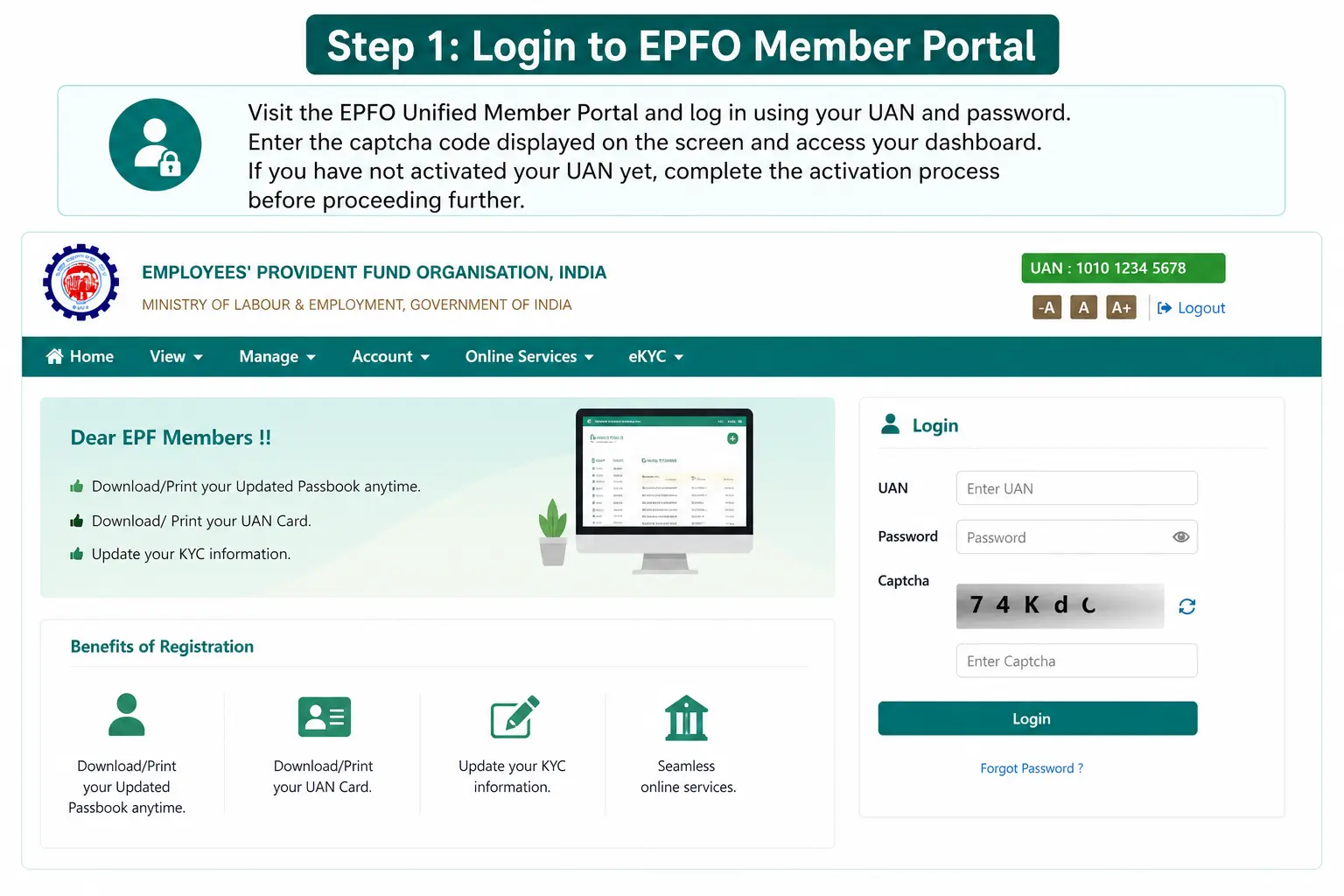
Visit the EPFO Unified Member Portal and log in using your UAN and password. Enter the captcha code displayed on the screen and access your dashboard. If you have not activated your UAN yet, complete the activation process before proceeding further.
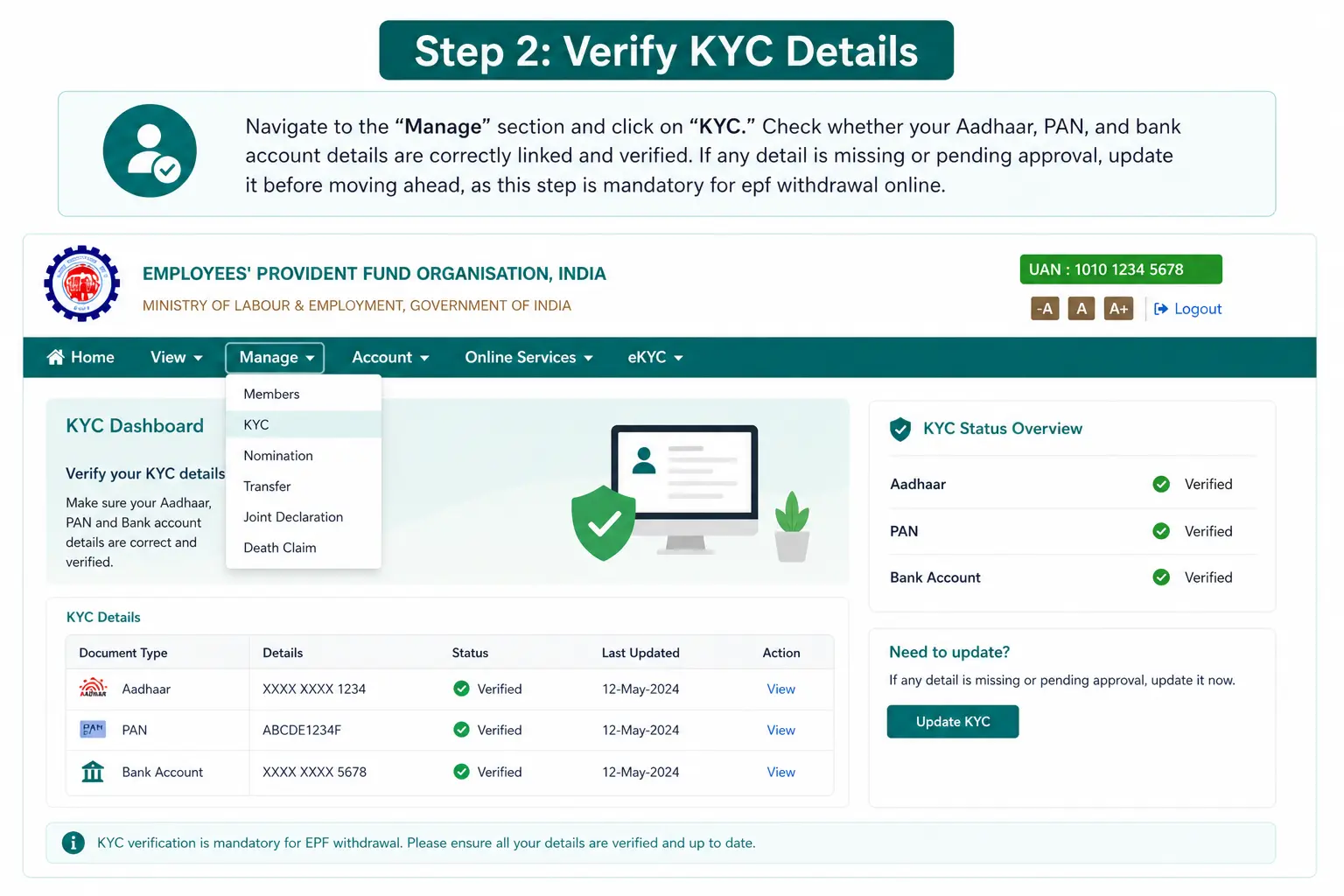
Navigate to the “Manage” section and click on “KYC.” Check whether your Aadhaar, PAN, and bank account details are correctly linked and verified. If any detail is missing or pending approval, update it before moving ahead, as this step is mandatory for epf withdrawal online.
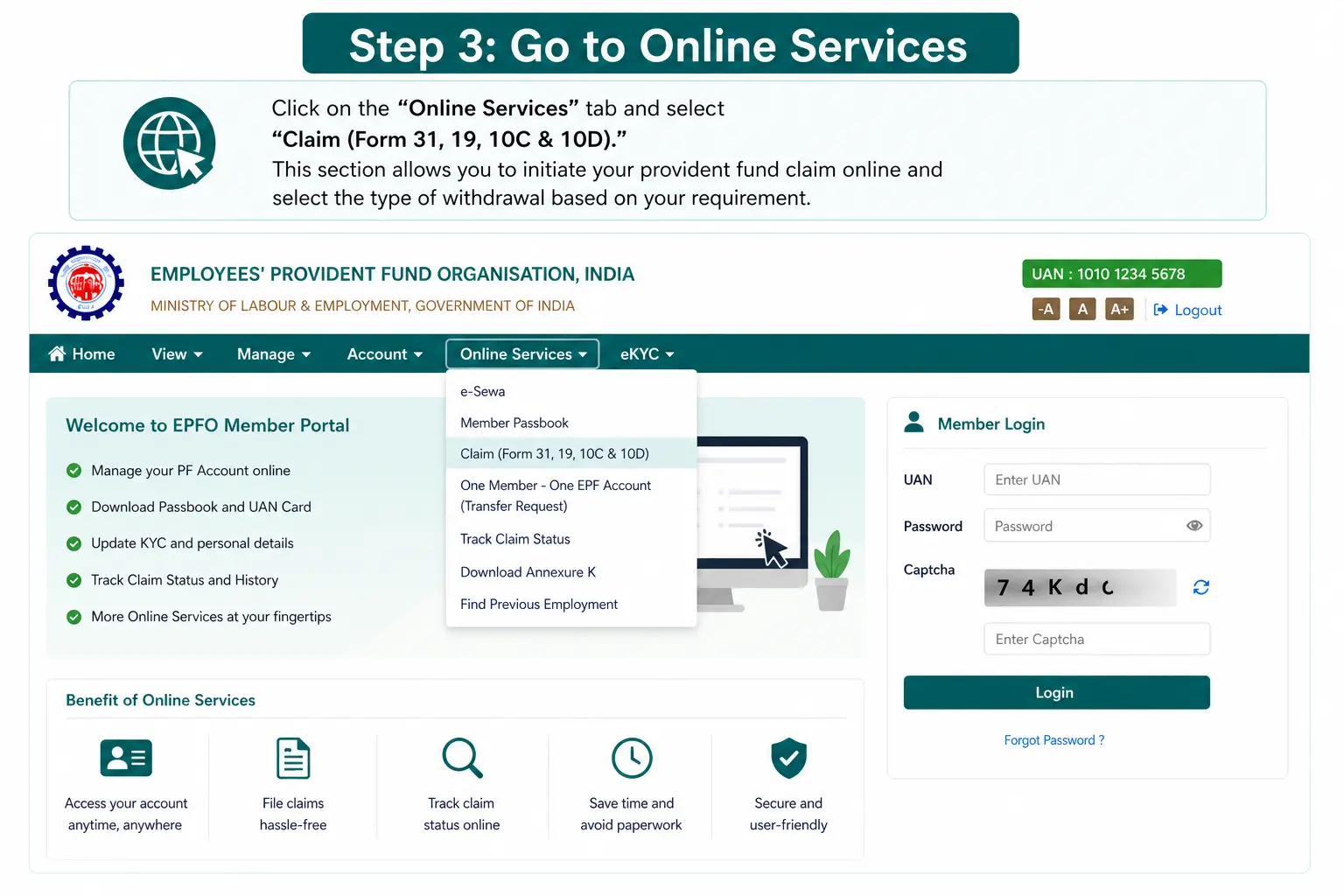
Click on the “Online Services” tab and select “Claim (Form 31, 19, 10C & 10D).” This section allows you to initiate your provident fund claim online and select the type of withdrawal based on your requirement.
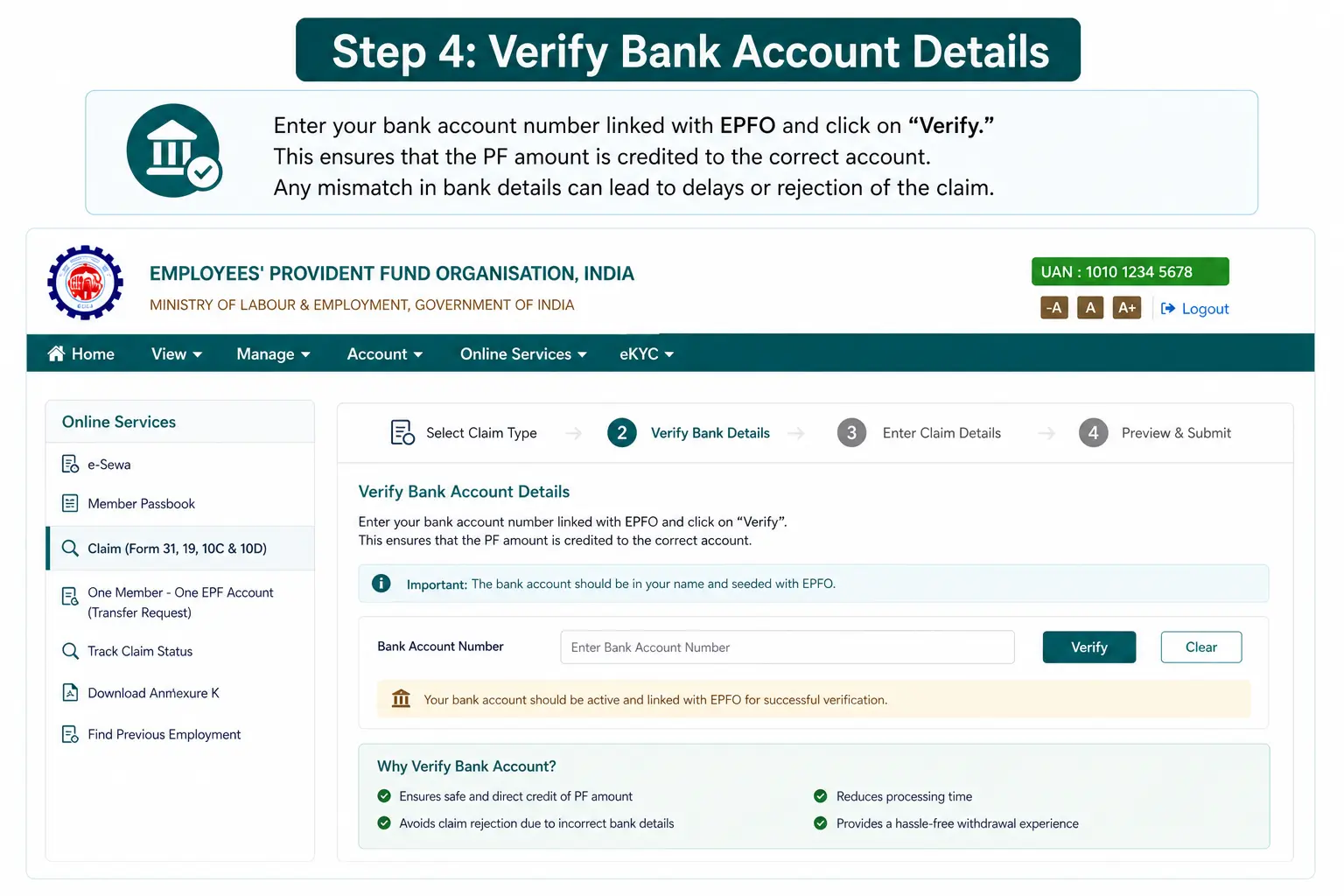
Enter your bank account number linked with EPFO and click on “Verify.” This ensures that the PF amount is credited to the correct account. Any mismatch in bank details can lead to delays or rejection of the claim.
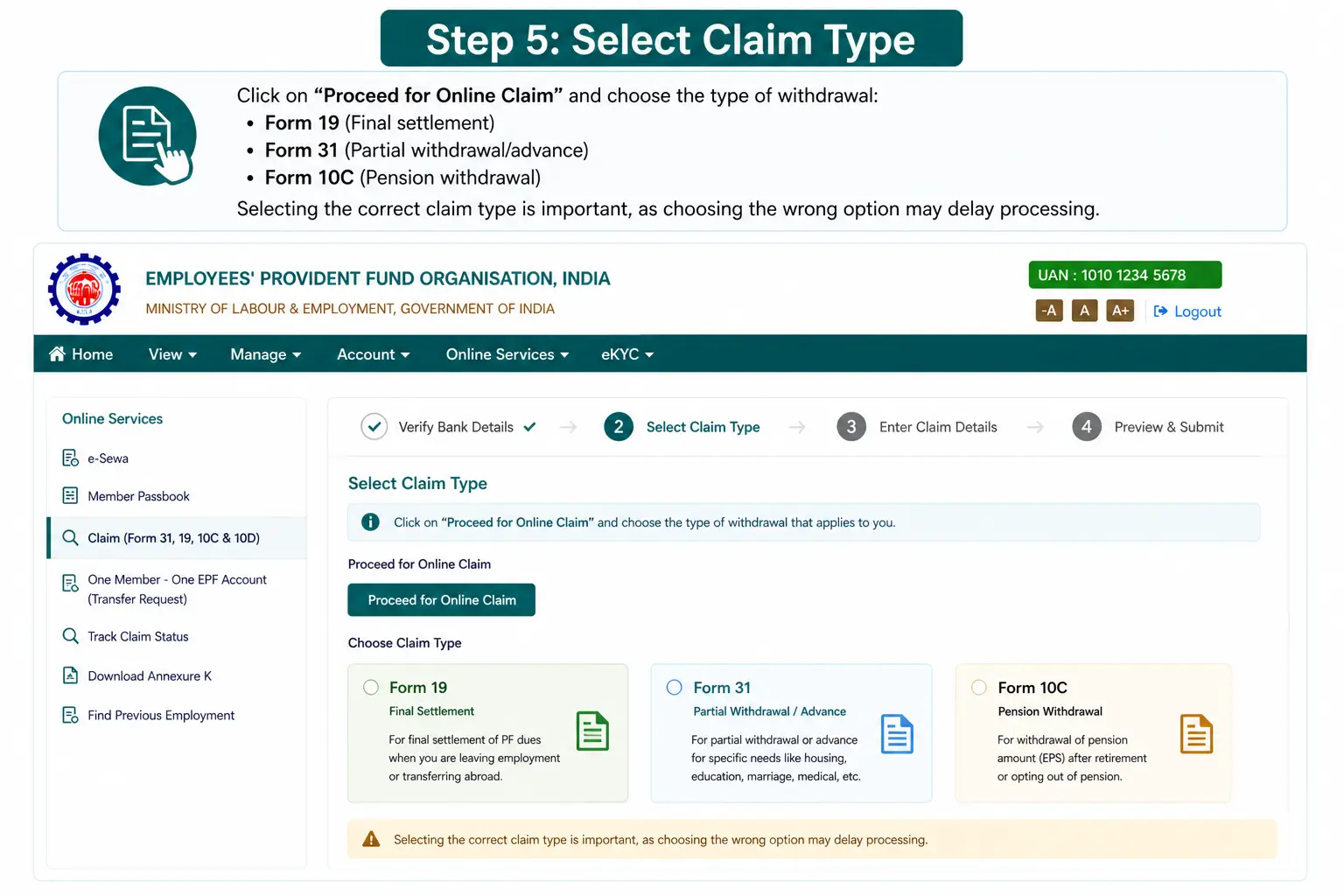
Click on “Proceed for Online Claim” and choose the type of withdrawal:
Selecting the correct claim type is important, as choosing the wrong option may delay processing.
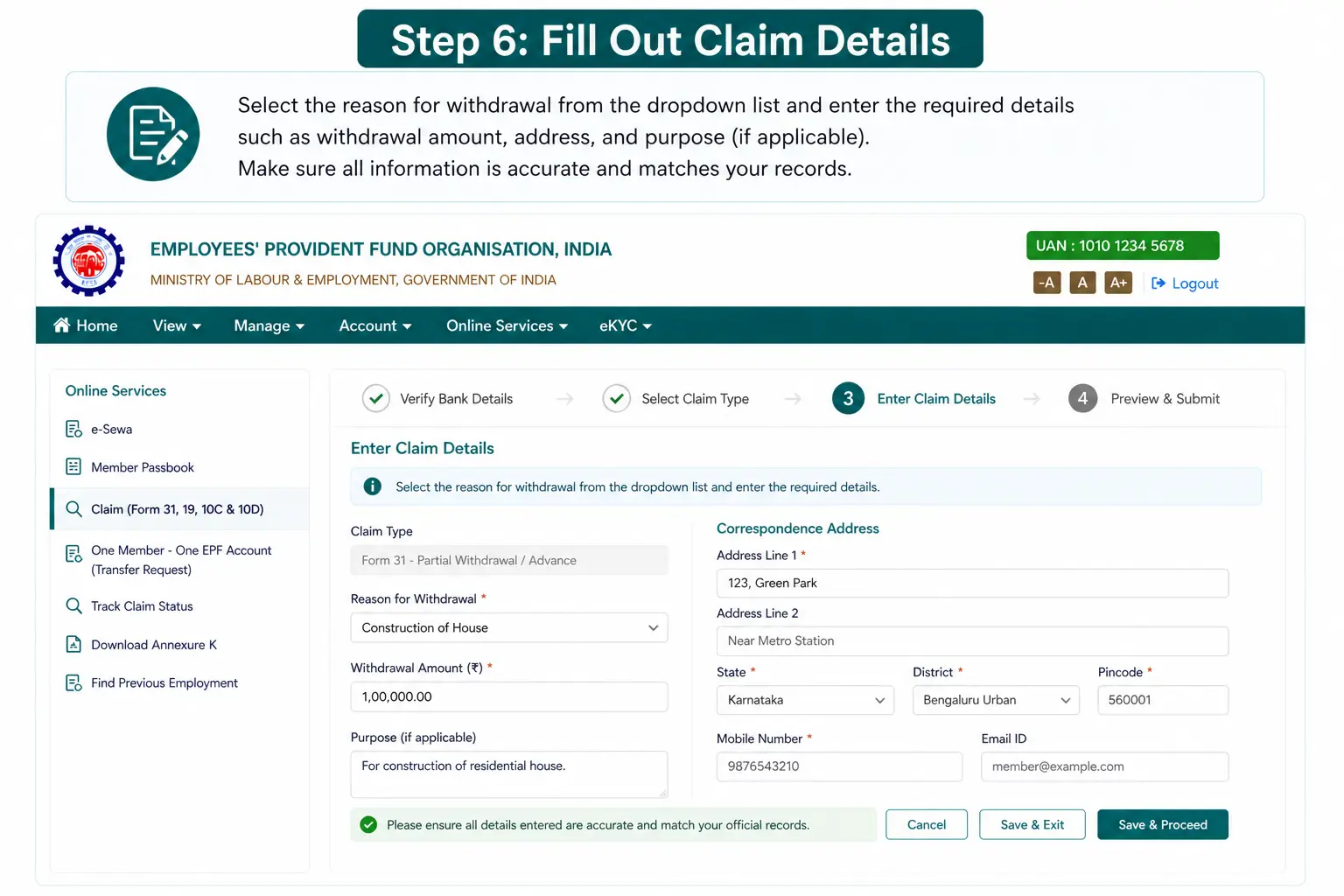
Select the reason for withdrawal from the dropdown list and enter the required details such as withdrawal amount, address, and purpose (if applicable). Make sure all information is accurate and matches your records.
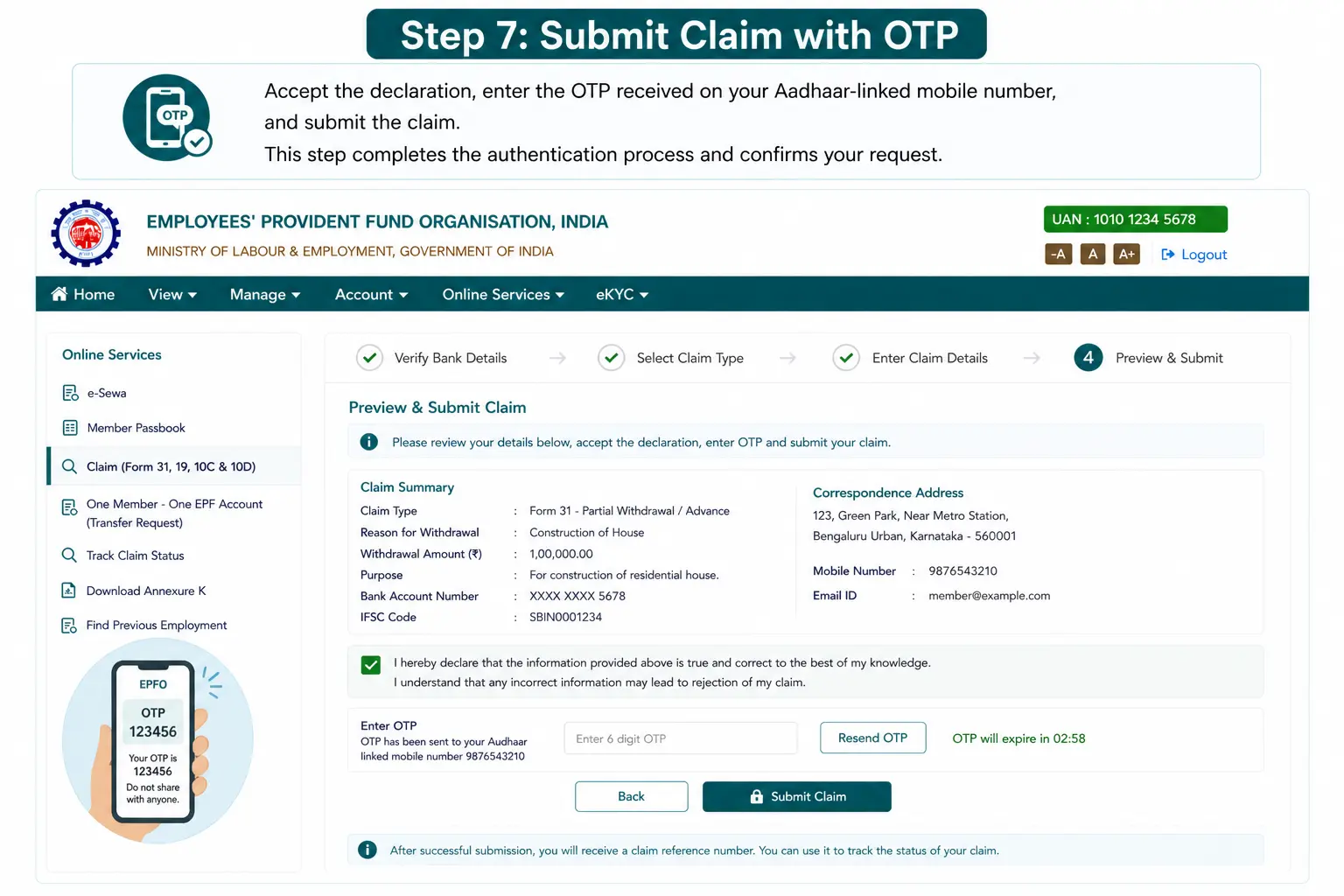
Accept the declaration, enter the OTP received on your Aadhaar-linked mobile number, and submit the claim. This step completes the authentication process and confirms your request.
After submission, you can track your claim under “Track Claim Status” in the portal. The system shows real-time updates such as under process, approved, or rejected, helping you stay informed throughout the process.
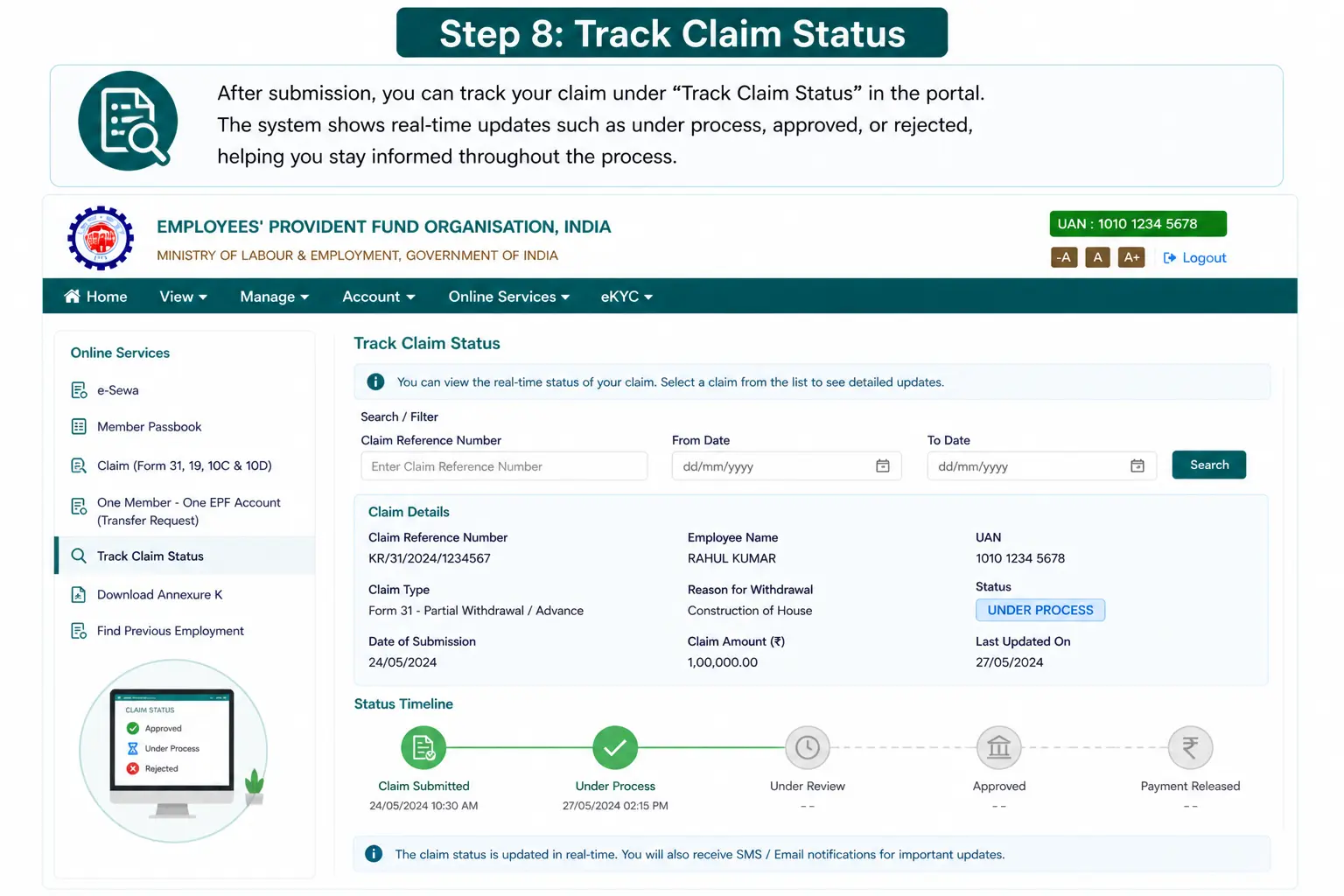
Understanding how to withdraw provident fund amount through the EPFO portal helps avoid common mistakes such as incorrect form selection, incomplete KYC, or wrong bank details. In most cases, claims are processed within 7-20 days if all information is accurate and verified.
The UMANG app, developed by the Government of India, provides a mobile-friendly way to access EPFO services. It is one of the easiest methods for how to withdraw epf money online, especially for users who prefer handling financial tasks directly from their smartphones without using a desktop.
Step-by-Step Process
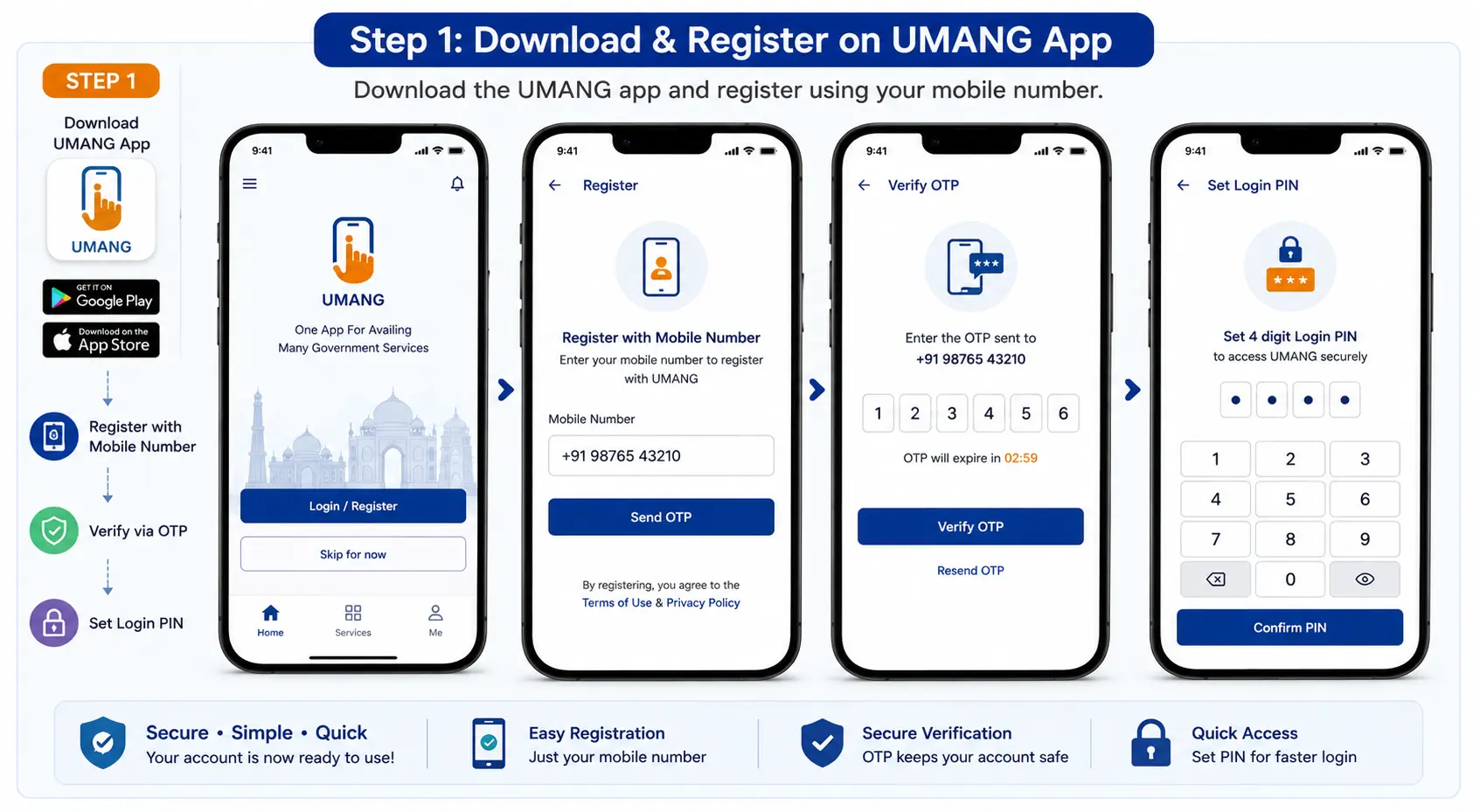
Download the UMANG app from the Google Play Store or Apple App Store. Once installed, register using your mobile number and verify it through OTP authentication. You can also set a login PIN for quick access in the future.
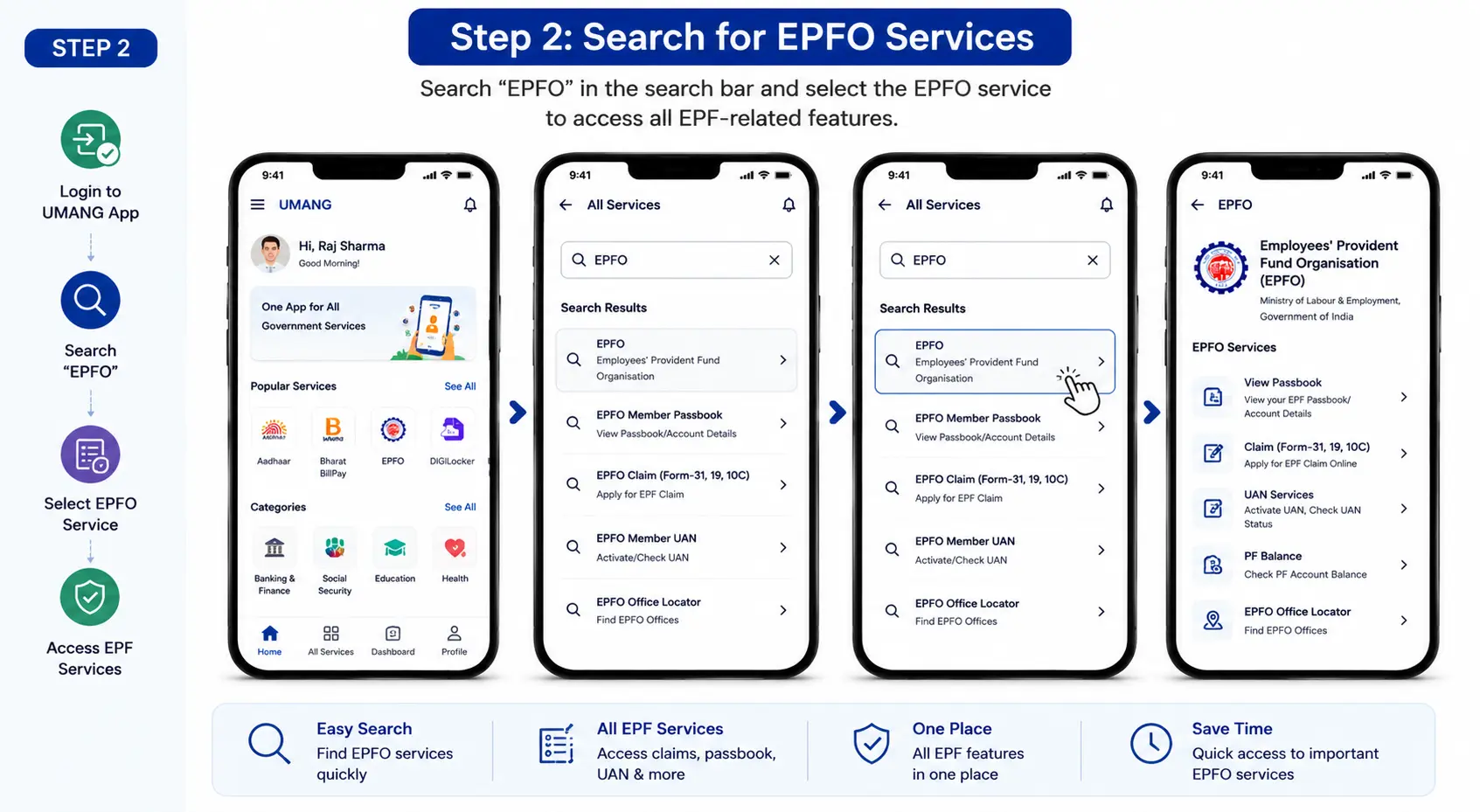
After logging in, go to the search bar and type “EPFO.” Select the EPFO service from the list of available government services. This section provides access to various EPF-related features like claim submission, balance check, and passbook viewing.
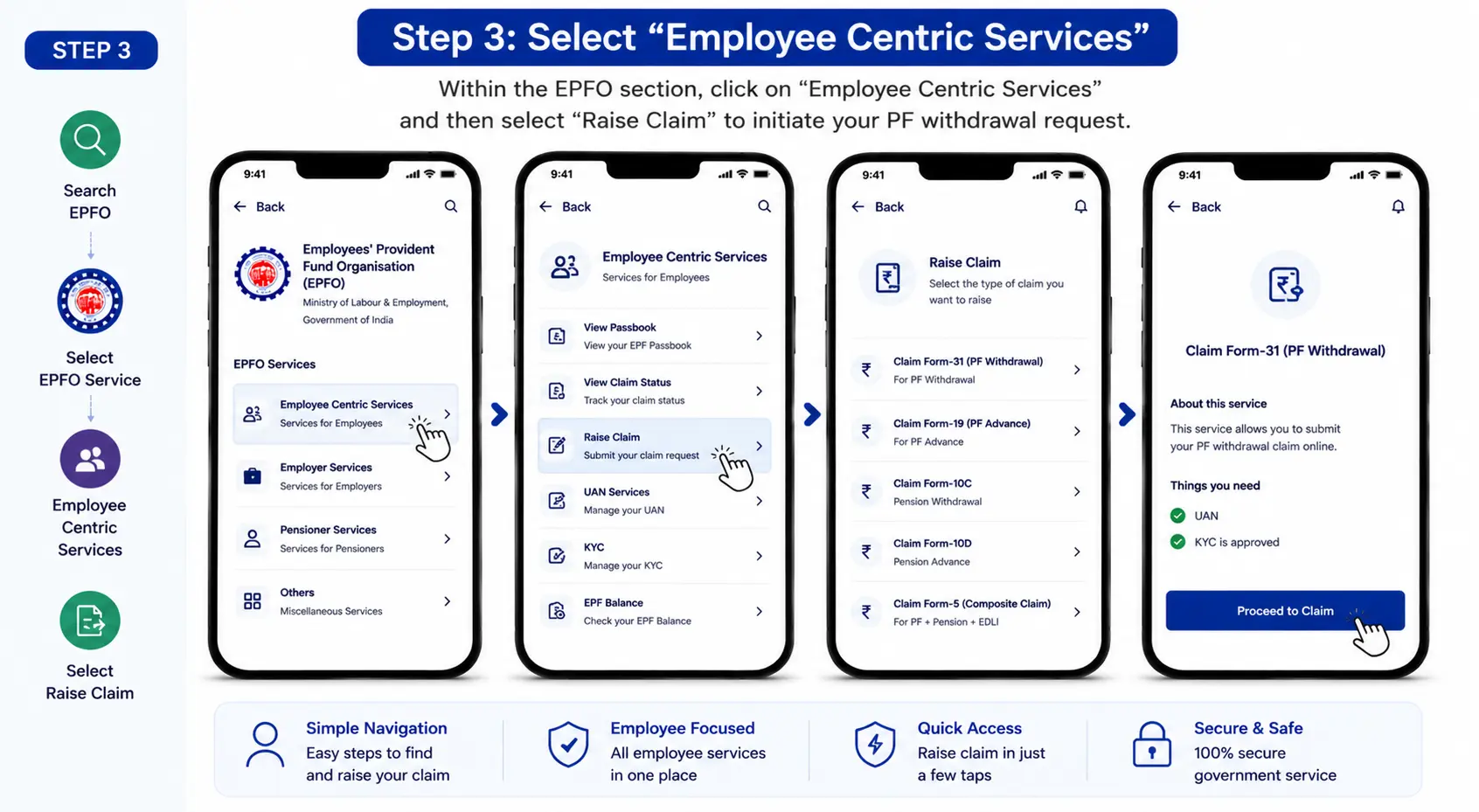
Within the EPFO section, click on “Employee Centric Services.” From the available options, select “Raise Claim.” This is where you initiate your PF withdrawal request through the app.
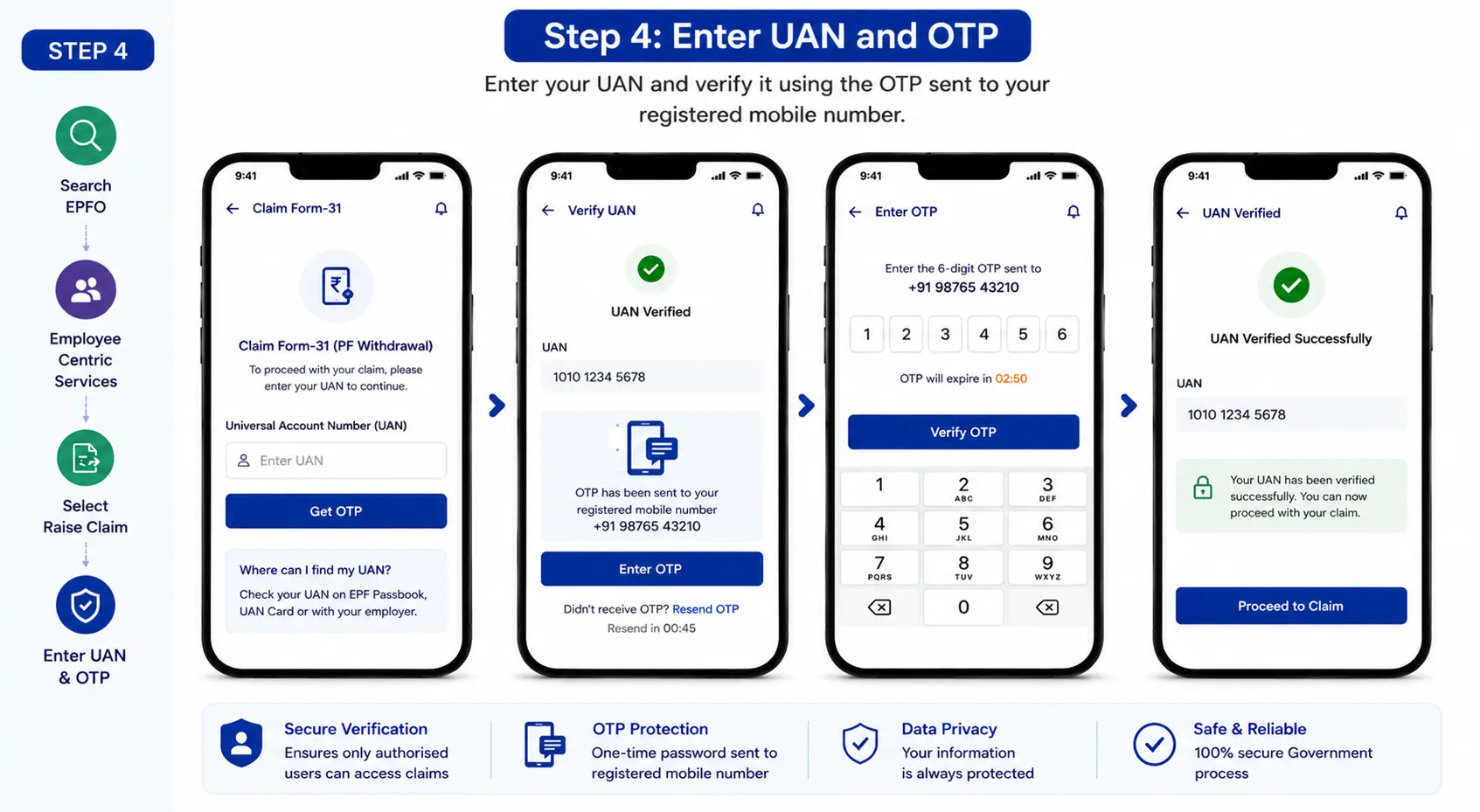
Enter your Universal Account Number (UAN) and verify it using the OTP sent to your registered mobile number. This step ensures that only authorised users can access and submit claims.
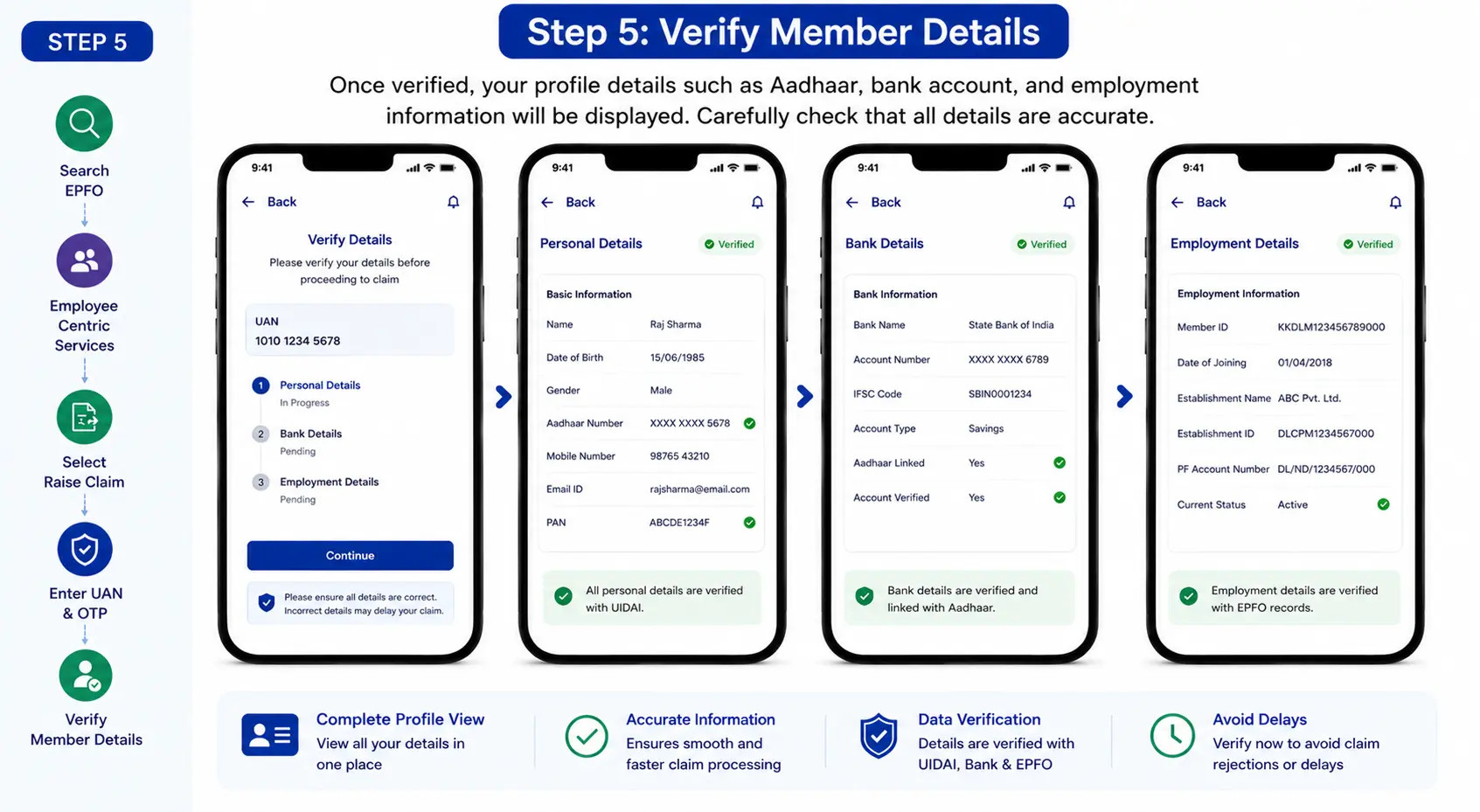
Once verified, your profile details such as Aadhaar, bank account, and employment information will be displayed. Carefully check that all details are accurate, as incorrect or incomplete information may delay the claim process.
Select the type of claim based on your requirement:
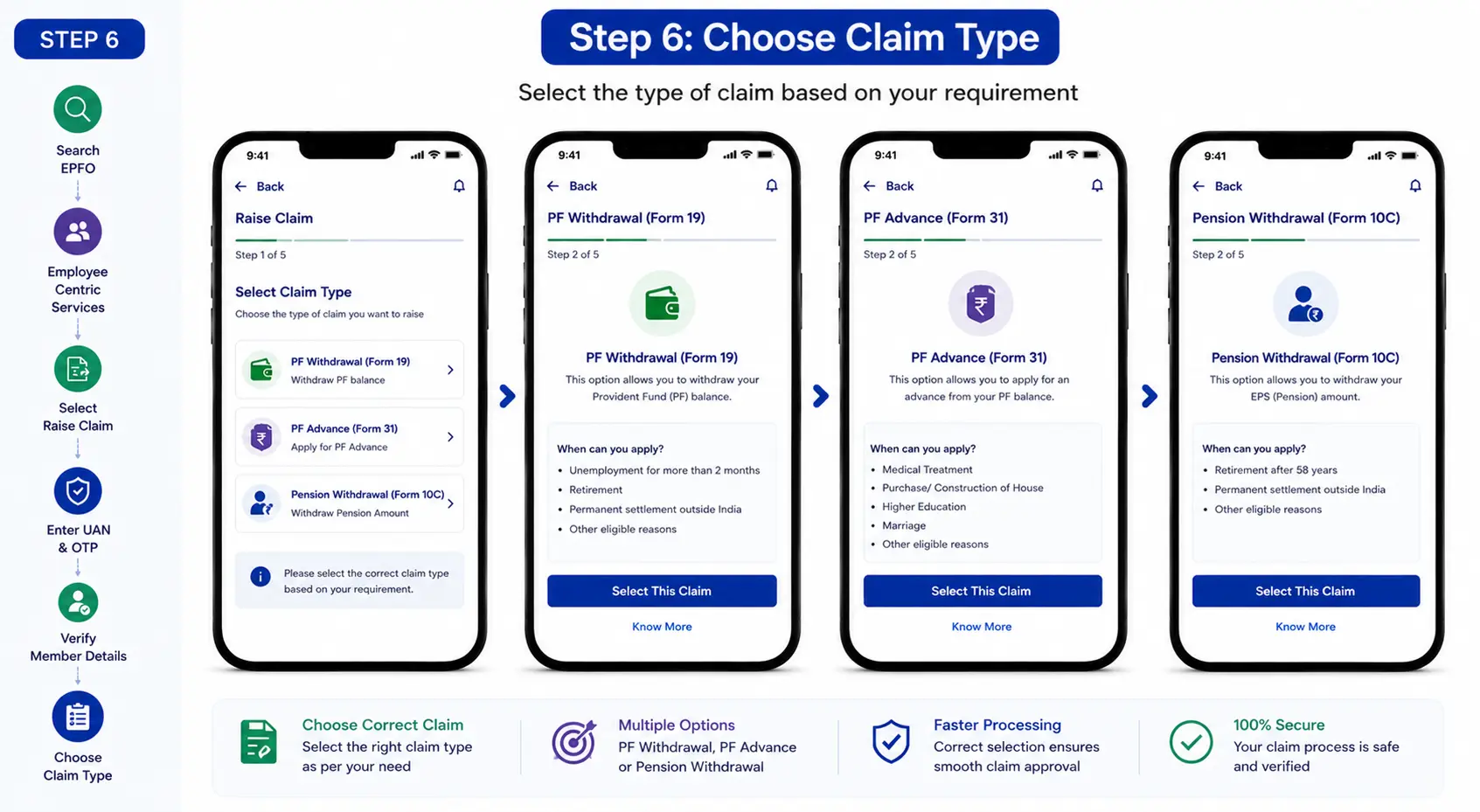
Choosing the correct claim type is important to ensure faster processing and avoid rejection.
Enter the required details such as withdrawal amount and reason, confirm the declaration, and submit the claim using OTP authentication. This step finalises your request for processing.
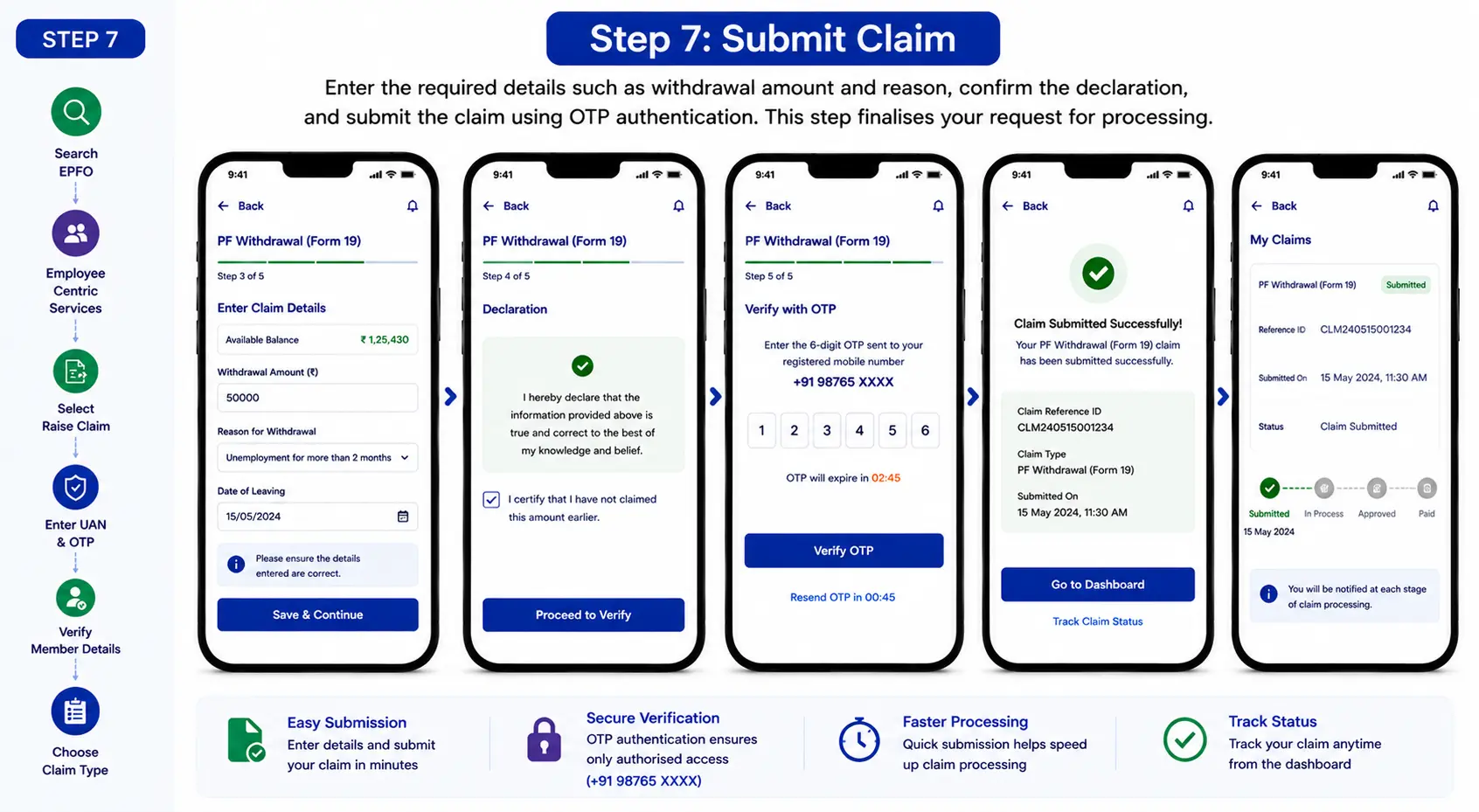
After submission, you can track your claim status directly within the app under “Claim Status” or “Service History.” The app provides real-time updates on whether your claim is under process, approved, or rejected.
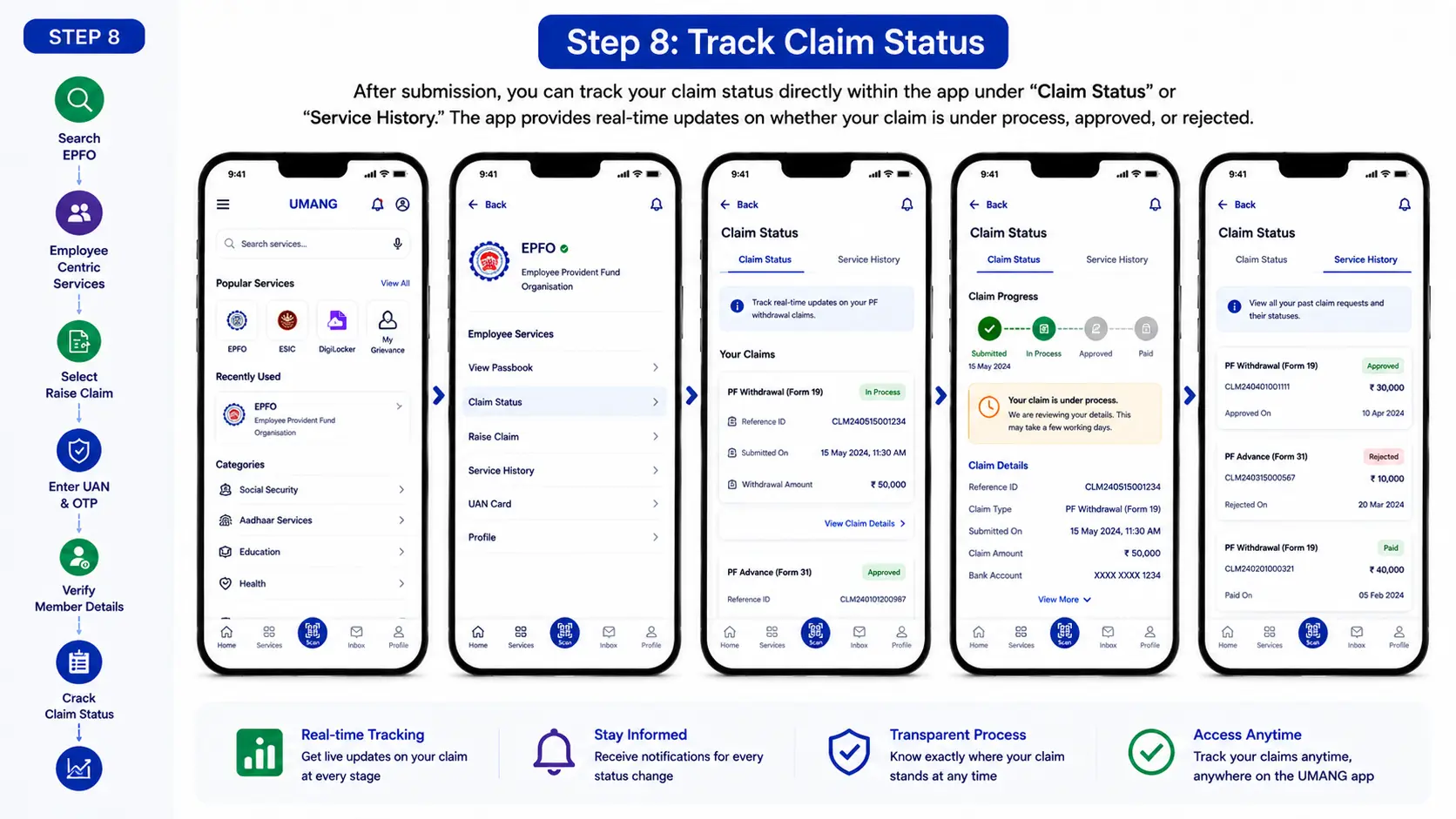
Using UMANG simplifies how to withdraw epf money online, especially for users who prefer mobile access. It reduces dependency on desktops and ensures quick, secure, and convenient access to EPFO services anytime, anywhere.
Checking your PF balance regularly helps you stay updated on your savings and plan withdrawals better. Before you proceed with how to withdraw pf amount online, it is important to know your available balance and contribution details.
EPFO provides multiple ways to check your PF balance, making the process simple and accessible for all users.
You can check your PF balance using the following options:
Each method offers a different level of detail and convenience depending on your preference.
Before initiating any claim, knowing your PF balance helps in:
This step becomes especially important when you are trying to understand how can i withdraw pf amount online, as the eligible withdrawal amount depends on your current balance and service history.
To access your PF balance smoothly, ensure:
Once these details are in place, you can easily check your PF balance through any of the available methods.
EPFO Member Portal (Online Method) – Checking your PF balance online is the most detailed and reliable method. It allows you to view contributions, interest earned, and overall account activity in one place.
Steps to Check PF Balance Online:
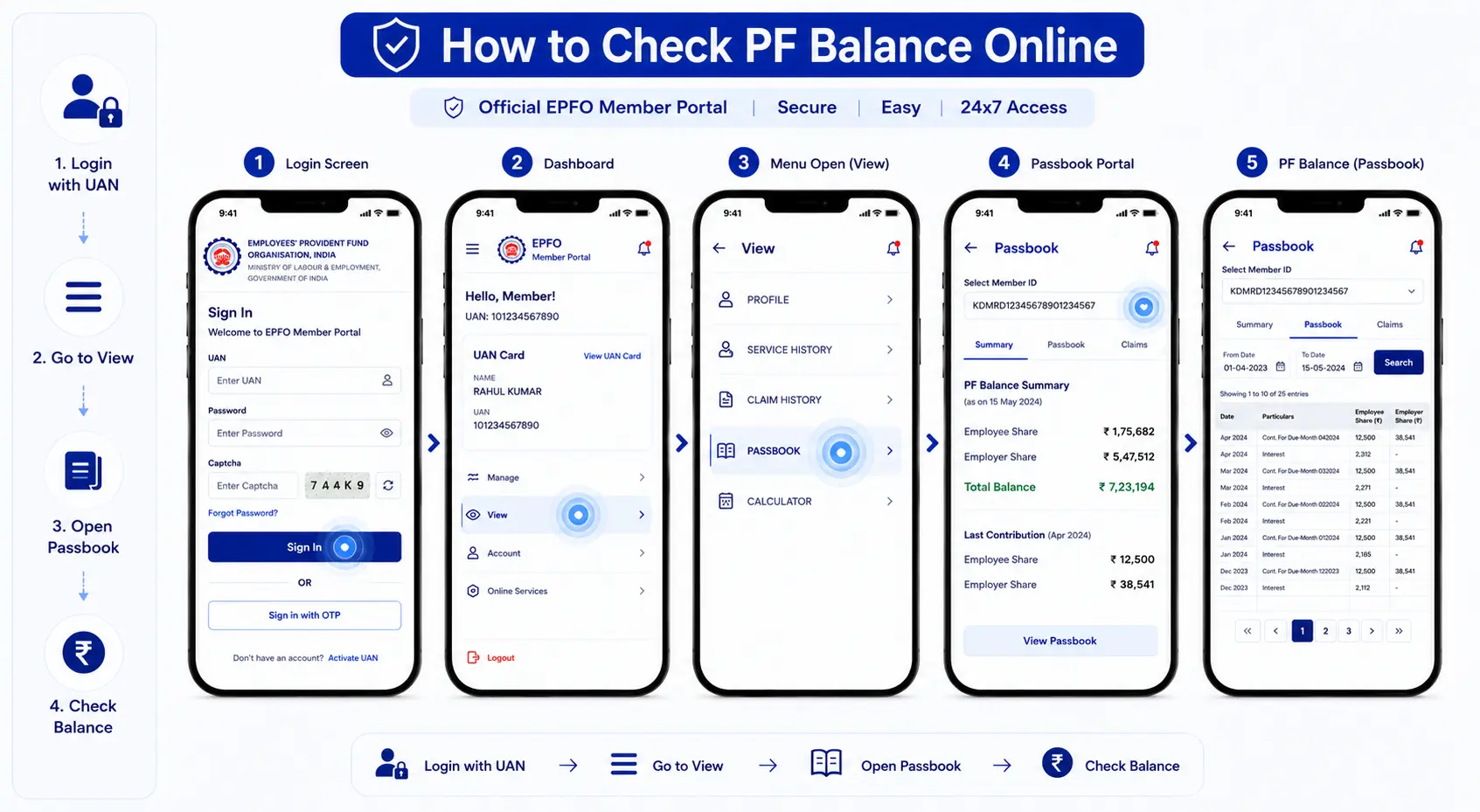
This method gives complete transparency, making it easier to plan pf amount withdrawal based on your actual balance.
EPFO also provides an SMS-based facility for users to check their PF balance without logging into the portal. This method is useful for quick access, especially when internet connectivity is limited.
Steps to Check PF Balance via SMS:
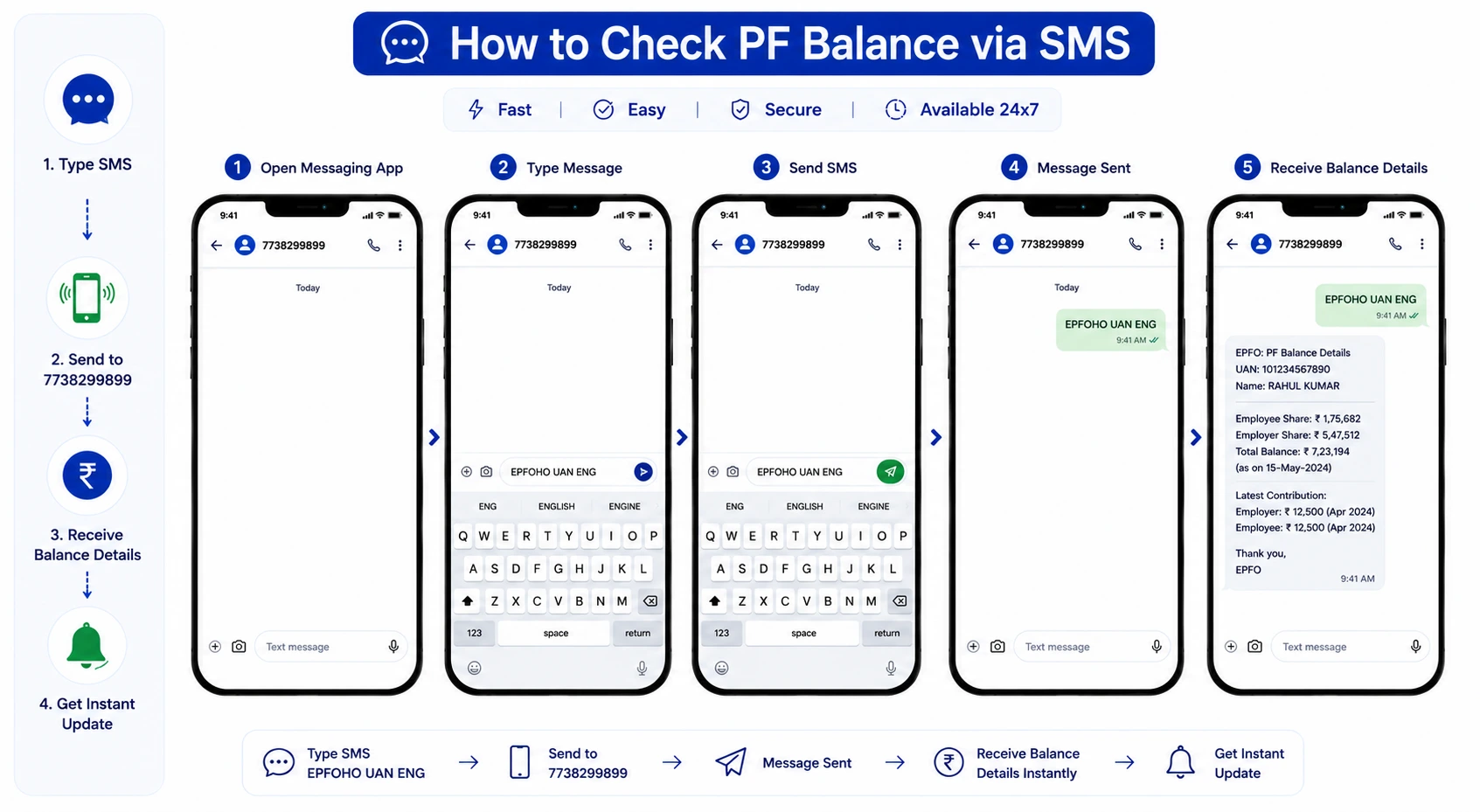
Once the message is sent, you will receive an SMS with details of your PF balance, including the latest contribution and account information linked to your UAN.
This method provides a quick snapshot of your balance without needing to access the full passbook.
The missed call service is one of the simplest ways to check your PF balance instantly. It does not require internet access or login credentials, making it convenient for quick updates.
Steps to Check PF Balance via Missed Call:
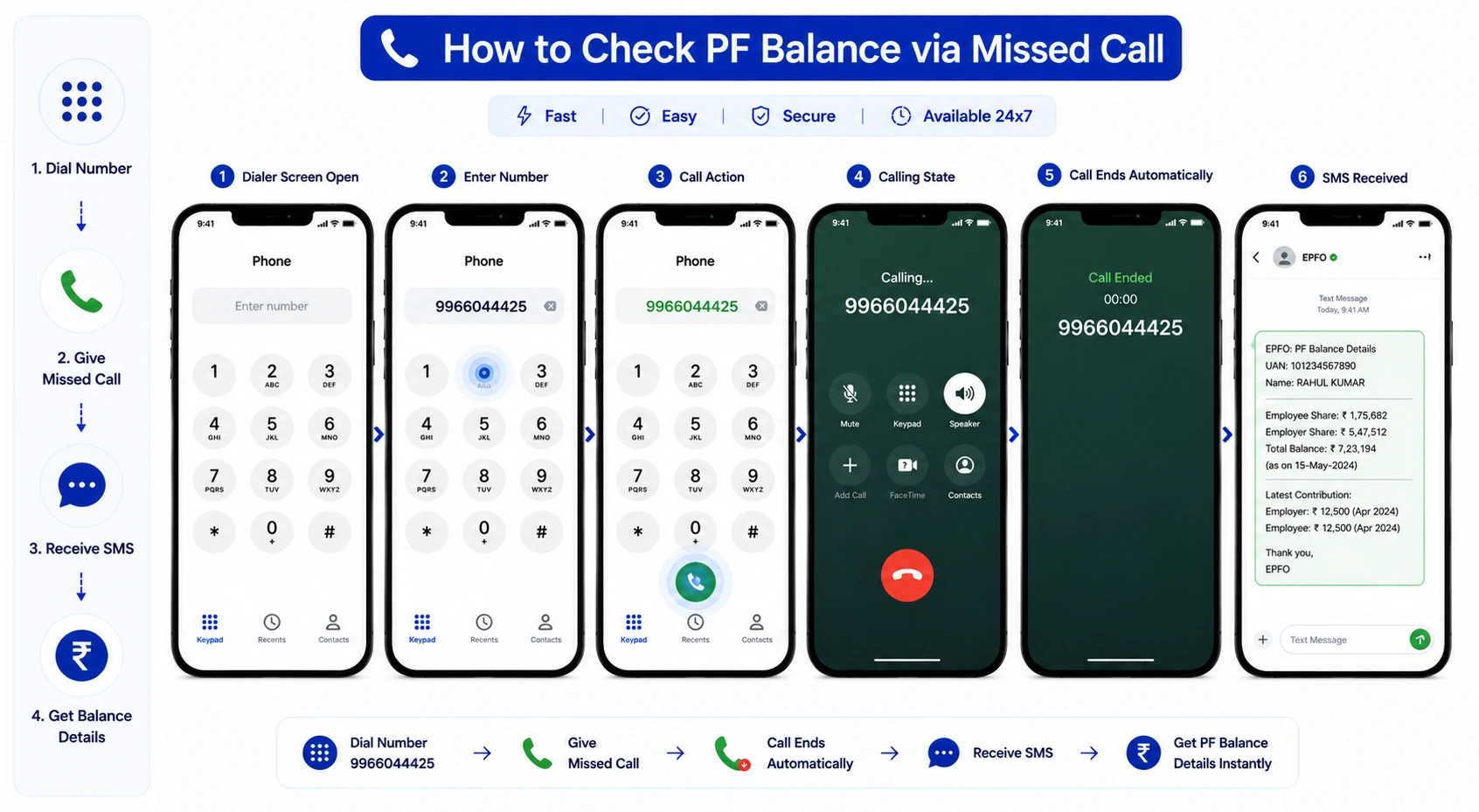
You will receive an SMS with your PF balance details, including the latest contribution status. This method is fast and useful for users who prefer a hassle-free way to check their balance without accessing online platforms.
Before initiating a withdrawal, it is important to estimate how much you are eligible to withdraw based on your EPF balance and purpose. The withdrawable amount is not always equal to your total balance, especially in cases of partial withdrawal.
For Example:
Suppose your basic salary is ₹25,000 per month and your total PF balance is ₹4,00,000. If you are applying for a housing-related withdrawal, EPFO may allow up to 36 months’ basic salary.
In this case: ₹25,000 × 36 = ₹9,00,000
Since your PF balance is ₹4,00,000, you can withdraw up to ₹4,00,000 (lower of the two limits).
This helps you plan your claim better and understand how to withdraw pf amount online without errors or delays.
Submitting the correct documents is essential for a smooth and timely pf amount withdrawal. EPFO has simplified the process significantly, especially for online claims, but certain KYC and verification requirements must be fulfilled before applying. Missing or incorrect details are one of the most common reasons for claim delays or rejection.
For most users, PF withdrawal is processed through Aadhaar-based verification, which reduces the need for physical paperwork. However, it is still important to ensure that all required information is correctly updated in your EPFO profile before initiating the claim.
For online claims, the following documents/details are typically required:
Depending on the type of withdrawal, additional details may be required:
Many users face delays due to simple errors. To avoid this:
Proper documentation plays a crucial role in ensuring your claim is processed quickly under the provident fund claim online system. It reduces verification time and minimises the chances of rejection.
Understanding how to claim provident funds online also involves preparing these documents in advance. When all details are accurate and verified, the entire withdrawal process becomes faster, more secure, and hassle-free.
Understanding the correct forms is essential for a smooth withdrawal process. EPFO has streamlined multiple forms into a Composite Claim Form, but individual forms are still relevant based on the type of claim.
Used to withdraw the entire EPF balance after retirement or leaving employment. This form is applicable when you want complete closure of your PF account.
Used for withdrawing a portion of your PF balance during employment for specific needs like medical emergencies, education, marriage, or housing.
Used to withdraw pension benefits under EPS if the service period is less than 10 years or to obtain a scheme certificate.
Used to claim monthly pension after retirement if eligibility criteria (such as service period) are met.
Important Note: According to EPFO, members can submit Forms 19, 31, and 10C online without employer attestation if Aadhaar and bank KYC are verified.
EPF withdrawal is not always taxed in the same way. The tax treatment depends mainly on the length of continuous service, the amount withdrawn, and whether the withdrawal is made after retirement, job loss, or before completing the required service period.
EPF withdrawal is generally tax-free if the employee has completed 5 years of continuous service. This includes service with previous employers if the PF balance was transferred instead of withdrawn. So, if an employee changes jobs but transfers the EPF balance to the new employer, the service period continues for tax purposes.
EPF withdrawal is also generally not taxable in certain situations where employment ends due to reasons beyond the employee’s control, such as ill health, business closure, or discontinuation by the employer. Tax treatment may still depend on the facts of the case, so employees should review their specific situation before filing.
If an employee withdraws the EPF balance before completing 5 years of continuous service, the withdrawal may become taxable. In such cases, the amount can be taxed as per the individual’s applicable income tax slab.
The taxable portion may include:
This is why withdrawing EPF early should not be treated casually. It may create an additional tax liability in the year of withdrawal.
TDS may apply if EPF is withdrawn before 5 years of service and the withdrawal amount exceeds ₹50,000. EPFO’s TDS instructions mention that TDS is deducted under Section 192A at the time of payment. The same EPFO document also states that Form 15G or Form 15H may be submitted by eligible members whose total income is not taxable.
Generally:
According to ClearTax, TDS is deducted at 10% if PAN is provided and the EPF balance is withdrawn before 5 years of service, provided the withdrawal exceeds ₹50,000. If PAN is not provided, TDS may be deducted at a higher rate.
Before submitting a withdrawal claim, employees should:
Understanding taxability is important when you are planning how to claim of amount, because the timing of withdrawal can directly affect your tax outgo. It also helps answer questions like how many days does it take to get pf amount, since claims with incomplete PAN, KYC, or tax-related details may face delays. EPFO’s FAQ says that if the PF amount is not settled within 20 days, members can approach the Regional PF Commissioner or file a grievance through EPFiGMS.
| Scenario | Tax Treatment | TDS Applicability | Key Conditions |
|---|---|---|---|
| Withdrawal after 5 years of continuous service | Fully Tax-Free | No TDS | Includes transferred service from previous jobs; Applies to full or partial withdrawal |
| Withdrawal before 5 years (amount ≤ ₹50,000) | Taxable as per income slab | No TDS | Must be reported while filing ITR; No automatic deduction, but tax still applicable |
| Withdrawal before 5 years (amount > ₹50,000 with PAN) | Taxable | TDS at 10% | Deducted under Section 192A; Final tax depends on your slab |
| Withdrawal before 5 years (amount > ₹50,000 without PAN) | Taxable | TDS at highest rate (approx. 30% or more) | Higher TDS due to missing PAN; Can be adjusted during ITR filing |
| Submission of Form 15G / 15H | Depends on eligibility | No TDS (if accepted) | Only if total income is below taxable limit; Incorrect submission may lead to penalties |
| Withdrawal due to ill health / business closure / employer shutdown | Generally Tax-Free | No TDS | Considered involuntary termination; Subject to conditions |
| Employee contribution (if 80C claimed earlier) | Taxable if withdrawn early | May apply | Becomes taxable if withdrawn before 5 years |
| Interest on EPF contribution | Taxable if early withdrawal | May apply | Added to taxable income |
EPF (Employee Provident Fund) and PPF (Public Provident Fund) are two of the most widely used long-term savings options in India.
While both are designed to help individuals build a financial corpus over time, similar to traditional options like a fixed deposit, but with different contribution structures and withdrawal rules, they differ significantly in terms of eligibility, contribution structure, returns, and withdrawal rules.
Understanding these differences is essential for effective financial planning, especially when choosing the right mix of savings instruments for long-term goals.
| Parameter | EPF (Employee Provident Fund) | PPF (Public Provident Fund) |
|---|---|---|
| Eligibility | Salaried employees in EPF-covered organisations | Any Indian citizen (including self-employed) |
| Contribution | 12% of basic salary by employee + employer contribution | Voluntary investment (₹500 to ₹1.5 lakh annually) |
| Interest Rate | Declared by EPFO (often higher, reviewed periodically) | Fixed by government, revised quarterly |
| Lock-in Period | Till retirement or job change | 15 years (extendable in blocks of 5 years) |
| Withdrawal Rules | Partial and full withdrawal allowed under conditions | Partial withdrawal allowed after 5 years |
| Tax Benefits | EEE (Exempt-Exempt-Exempt) if conditions are met | EEE (Exempt-Exempt-Exempt) |
| Risk Level | Low (government-backed) | Very low (sovereign guarantee) |
Choosing between EPF and PPF depends on your financial goals and employment status:
Unlike borrowing products that involve fixed vs floating interest rates, EPF and PPF offer relatively stable returns, making them suitable for conservative long-term savings.
For many individuals, the decision is not about choosing one over the other, but about using both strategically to balance stability and flexibility in long-term savings.
EPF offers more flexibility in terms of withdrawals compared to PPF. Partial withdrawals are allowed for specific purposes such as medical emergencies, education, or housing. However, it is important to understand how to withdraw pf online correctly to avoid unnecessary delays or rejection.
PPF, on the other hand, has a stricter lock-in period of 15 years, although partial withdrawals and loan facilities are available after certain years. This makes PPF less liquid but more suitable for long-term disciplined investing without frequent withdrawals.
Yes, individuals can invest in both EPF and PPF simultaneously. Many investors use PPF as an additional savings tool to complement EPF, especially for long-term goals such as retirement planning, children’s education, or building a stable financial backup. Combining both options can help create a more balanced and diversified savings strategy.
When changing jobs or facing financial needs, employees often get confused between transferring their PF balance and withdrawing it. While both options are available, they serve very different purposes and can impact long-term savings differently. Understanding this difference is important before deciding how to withdraw pf online or whether to continue your EPF savings.
| Parameter | PF Transfer | PF Withdrawal |
|---|---|---|
| Meaning | Moving PF balance from old employer to new employer | Withdrawing full or partial PF balance |
| When Used | Job change with continued employment | Retirement, unemployment, or financial need |
| Impact on Savings | Continues and grows with interest | Reduces long-term savings |
| Tax Impact | No tax | May be taxable if withdrawn before 5 years |
| Employer Contribution | Continues | Stops after withdrawal |
| Interest Earnings | Continues uninterrupted | Stops once withdrawn |
PF transfer is recommended when you switch jobs and continue working under EPF-covered employment. Instead of withdrawing your balance, you transfer it to your new employer using the same UAN. This ensures that your savings continue to grow without interruption.
In addition to these benefits, PF transfer also simplifies record management. Since all contributions remain linked under a single UAN, it becomes easier to track balances, verify contributions, and manage future claims.
PF withdrawal is suitable when you need funds for specific purposes or are no longer employed. It can be either full withdrawal (after leaving a job) or partial withdrawal (for approved reasons such as medical emergencies or housing needs).
However, before deciding how to withdraw provident fund amount, it is important to consider the long-term impact. Withdrawing funds early can reduce the power of compounding and may affect your retirement savings.
It is also important to note that partial withdrawals are often a better option than full withdrawal, as they allow you to meet immediate needs while keeping the remaining balance intact for future growth.
The choice between transfer and withdrawal depends on your financial situation and goals:
A thoughtful approach can help you avoid unnecessary financial strain later.
Before taking action, consider the following:
Understanding these differences helps you make informed decisions instead of reacting to short-term needs. It also ensures that you only proceed with how to withdraw pf amount online when absolutely necessary, preserving your long-term financial security.
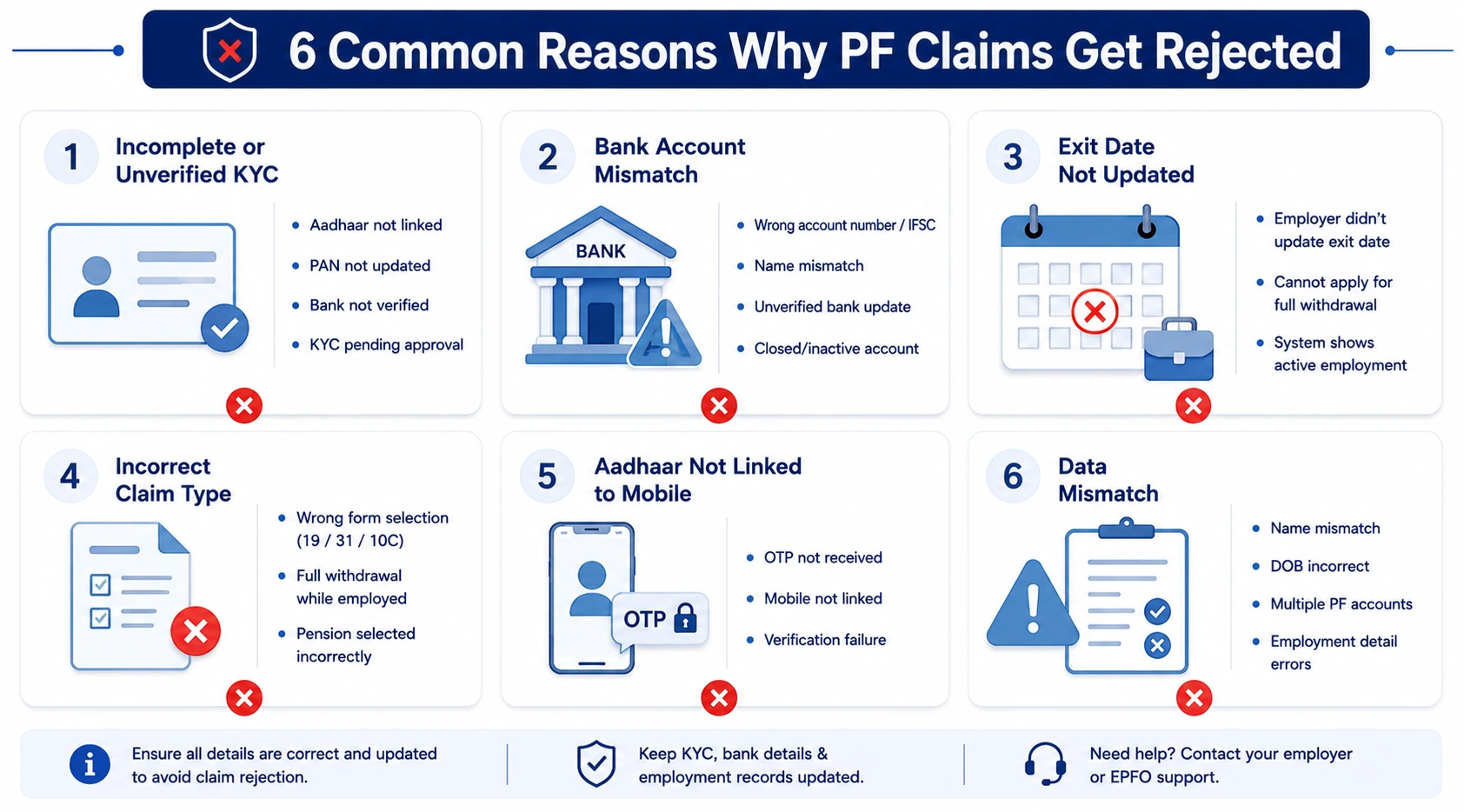
PF claim rejection is more common than most users expect, and in many cases, it happens due to small but avoidable mistakes. Understanding the common reasons behind rejection can help you correct errors in advance and ensure smoother processing when you apply. Even when you follow the correct process, missing a small detail can delay your claim significantly.
One of the most common reasons for rejection is incomplete KYC. If your Aadhaar, PAN, or bank details are not verified, your claim may not be processed.
All KYC details must be approved and visible as “verified” in the EPFO portal before applying.
Incorrect or inconsistent bank details can lead to claim rejection or payment failure.
Since PF amount is directly credited, even a small error can lead to rejection or return of funds.
For full withdrawal, your employer must update your date of exit in EPFO records.
Without the exit date, the system assumes you are still employed, making you ineligible for full withdrawal.
Choosing the wrong form (Form 19, 31, or 10C) can lead to rejection.
Understanding how to claim pf amount correctly is important to avoid this mistake and ensure faster processing.
OTP-based authentication is mandatory for online claims.
Without successful OTP verification, the claim cannot be submitted or processed further.
Mismatch in personal or employment details can trigger rejection during verification.
Such discrepancies create verification issues and must be corrected before applying again.
To reduce the chances of rejection:
A careful approach can save time and prevent repeated claim rejections.
With the increasing use of digital platforms for EPF services, users must stay alert to potential fraud and security risks. Since PF accounts contain sensitive personal and financial information, even a small lapse in security can lead to misuse.
Some common fraud attempts include:
EPFO has clearly stated that it never asks for personal details such as OTP, passwords, or bank information through calls or messages.
To protect your EPF account, follow these precautions:
Before proceeding with any request related to how to withdraw pf online, ensure that you are accessing the official EPFO platform. Many fraud cases happen due to fake websites that look similar to genuine portals.
Being aware of these risks helps protect your savings and ensures that your EPF account remains secure while using online services.





Leave a comment